Getting Started with Tool Tracking Using Teamcenter
In many companies, tool components and their inventory are already managed in ERP systems. Nevertheless, a crucial question remains unanswered in day-to-day manufacturing: Which complete tools are currently available, where are they located, and which tools still need to be assembled or measured for the next manufacturing operation?
The Shop Floor Connect Resource Tracker closes exactly this gap. As an extension of Shop Floor Connect, it connects manufacturing with equipment management in Teamcenter MRL. Complete tools can be tracked in Teamcenter and assigned to their actual storage locations on the shop floor.
This eliminates the need for Excel spreadsheets or paper records to manage complete tools.
Would you like to know where your complete tool sets are located and what’s still missing for the next job?
Together, we’ll review your tool management and show you how the Resource Tracker integrates into your existing Teamcenter and manufacturing environment.
Where is each tool located?
Tool magazines, cabinets, and tool carts can be mapped as storage locations in Teamcenter and linked to the resources managed in Teamcenter MRL.
This makes it clear which complete tool sets are available and where they are located. The current magazine allocation for a machine can also be tracked in Teamcenter.
The Resource Tracker thus supplements the digital description of a tool in MRL with information critical to production regarding its actual location.
→ Learn more about Teamcenter MRL
Determining Tool Requirements for the Next Manufacturing Operation
Tool tracking becomes particularly useful when preparing a new manufacturing order. The Resource Tracker determines tool requirements based on the tools needed for the CAM operation, taking known storage locations into account.
This assessment reveals which complete tools are already available and which tools still require action.
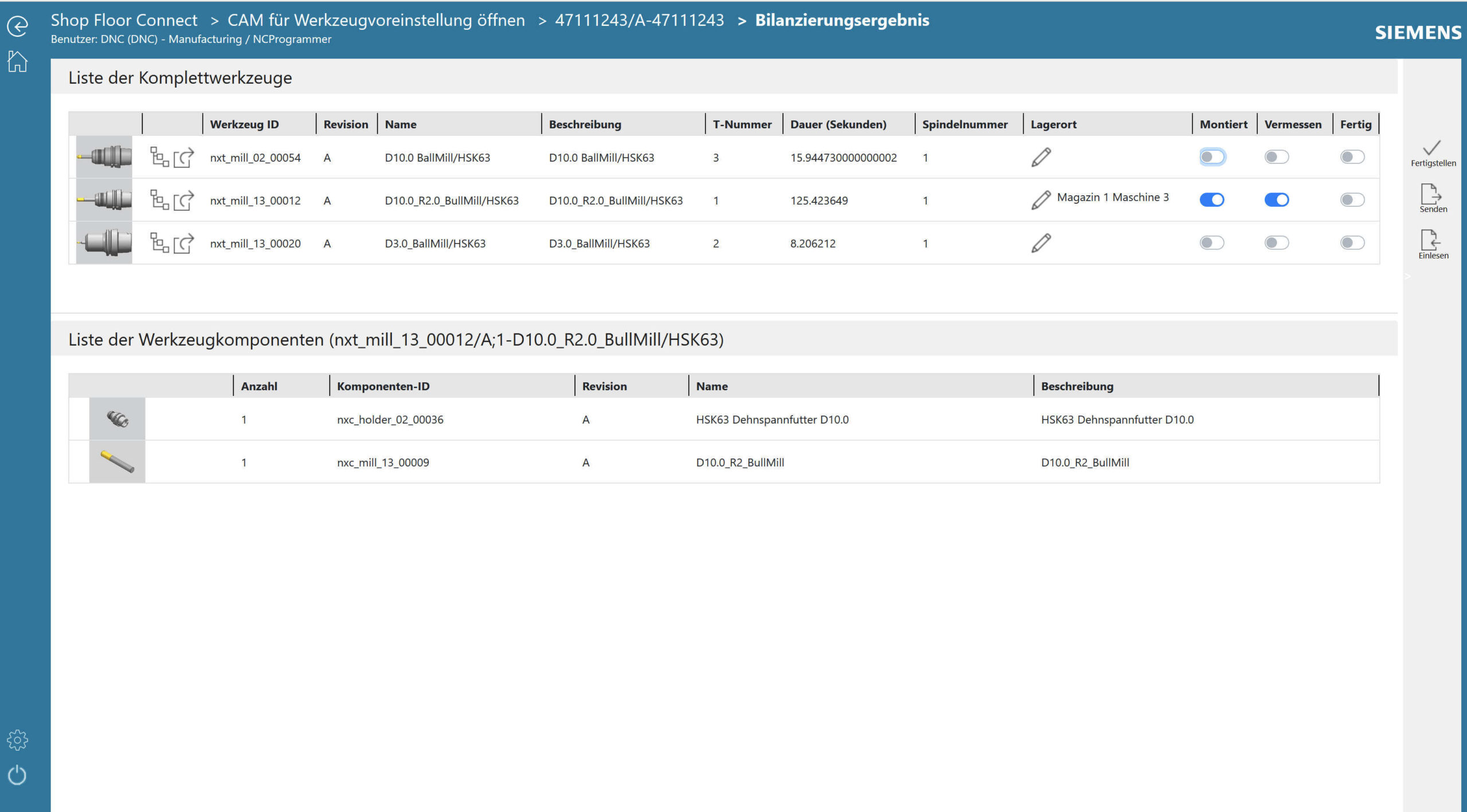
Tool Requirements at a Glance. The inventory report shows the complete tools required, along with their storage location and availability status. For the selected tool, the associated tool components are also displayed.
Prepare Tool Presetting and Setup More Effectively
A tool requirements list for tool presetting or the tool presetting device can be generated from the inventory report. The necessary information regarding the complete tool sets is immediately available.
The machine operator receives a setup overview for the upcoming production run. Loading and unloading lists then support the tool changeover at the machine.
If tools are relocated, their storage locations can be updated accordingly in Teamcenter. This ensures that the digital information remains linked to the actual situation on the production floor.
Effectively Expanding Shop Floor Connect and MRL
The Resource Tracker is not a standalone tool management system. It builds on Shop Floor Connect and Teamcenter MRL and links their information to the actual tool provisioning on the shop floor.
MRL provides centrally managed tool and resource data. Shop Floor Connect brings approved production information to the shop floor. The Resource Tracker supplements this information by indicating where complete tool sets are located and which of them are needed for the next production task.
→ Learn more about Shop Floor Connect
This integration also supports NC programmers. When planning a CAM operation, it allows for better consideration of available tools and their availability. This is particularly helpful when short-notice orders need to be squeezed into the production schedule.
A Gateway to Physical Resource Management
The Resource Tracker provides a relatively straightforward way to begin tracking physical tools within the Teamcenter environment.
Your Benefits with the Resource Tracker
- Track complete tool sets and their storage locations in Teamcenter
- Display current magazine occupancy
- Determine tool requirements for upcoming CAM operations
- Identify missing tools early on
- Support tool presetting with specific requirement lists
- Prepare setup procedures for machine operators in a more organized manner
- Integrate loading and unloading processes with tool management
- Reduce reliance on manual Excel and paper lists
- Reuse existing information from Teamcenter MRL and Shop Floor Connect
Prerequisites for Use
The Resource Tracker requires an existing Teamcenter MRL environment, the necessary PM0 template, and a suitable, up-to-date version of Shop Floor Connect.
You should check the current release status to determine which Teamcenter and Shop Floor Connect versions are approved for your specific installation.
Do you know today which tools are available for the next job?
A well-maintained tool database does not automatically answer the question of where a complete tool is currently located and whether it is ready for use on the next production order.
The Shop Floor Connect Resource Tracker brings this information together and makes it available within the Teamcenter environment.