
Integration of third-party manufacturing systems into Teamcenter
For those using Teamcenter as a central PLM platform, the goal is to manage product and manufacturing information as seamlessly as possible. However, production environments often involve a wide range of additional systems—including CAM and CMM solutions, simulation software, automation systems, and applications for physical tool management.
With the 3rd Party Part Manufacturing Integrator, A+B Solutions has developed an integration platform that allows such third-party manufacturing systems to be connected to Teamcenter.
This ensures that information from Teamcenter is available within external manufacturing solutions. Conversely, data generated in those external systems can be fed back into the Teamcenter process chain in a controlled manner for ongoing management.
Are you looking to integrate an existing manufacturing solution into Teamcenter?
A+B has already implemented numerous such connections and continues to develop the integration platform further. We will work with you to determine the best way to effectively integrate your existing system with Teamcenter.
Flexible Integration of Diverse Systems
The 3rd Party Part Manufacturing Integrator consists of three independently deployable components. This allows the integration to be tailored to the specific application and the desired level of integration depth.
3rd Party Part MFG Integrator in TC – Data Management
This component integrates external systems into Teamcenter data management. Data can be queried, created, and downloaded. It also supports the creation of Teamcenter items and revisions, as well as user login and various other Teamcenter functions.
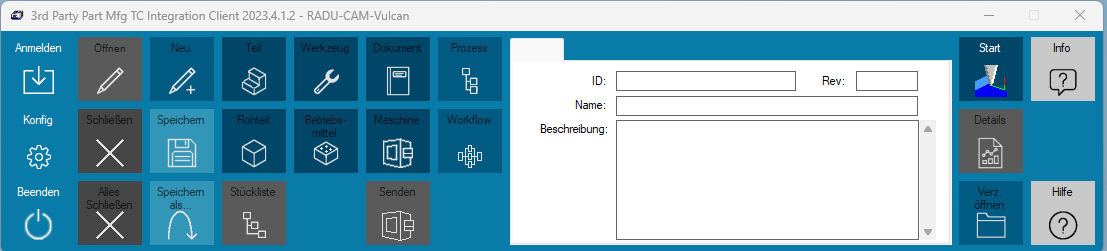
Example of an external interface for Teamcenter integration. Functions for opening, creating, and saving data—as well as for parts, tools, documents, processes, and workflows—are directly accessible.
3rd-Party Manufacturing Resource Integration in TC – MRL Access
MRL Access enables the connection of CAM, simulation, or physical tool management systems to the Teamcenter Manufacturing Resource Library (MRL).
Tools and other manufacturing resources from the MRL are thus made available for tasks such as NC programming or the simulation of machining paths. Furthermore, tool master data can be exchanged between Teamcenter and connected external systems.
→ More about Teamcenter MRL
3rd Party Part MFG Integrator in TC – Service
The service component enables direct communication between Teamcenter and manufacturing solutions that support a service-based architecture.
This allows for the integration of systems such as cell management or tool management, facilitating the exchange of manufacturing-related data and information regarding production resources between the involved applications.
The appropriate level of integration for each specific application
Not every third-party system needs to be connected to Teamcenter in the same way. The 3rd Party Integrator therefore supports various levels of integration.
Connectivity can be established via a separate interface. In cases of deeper integration, Teamcenter queries can be embedded directly into the user interface of the respective application, or information can be exchanged via a service architecture.
Direct integration into a third-party system requires collaboration with the respective solution provider.
Existing Integrations – Level 1
Connection via an external interface
The following integrations use a separate interface for communication with Teamcenter.

edgecam
Teamcenter integration via an API client for managing Edgecam source and output data. The solution supports logging into Teamcenter, as well as searching for and loading managed Teamcenter data from within Edgecam.

RADU-CAM
Teamcenter integration via an API client for managing RADU-CAM source and output data. Connection to the Teamcenter Manufacturing Resource Library to manage RADU-CAM tools and utilize them during programming. Teamcenter login, searching for and loading managed Teamcenter data within RADU-CAM. Initiating workflows and creating revisions.

PEPS
Integration of programming software for wire EDM machines. Approved design data is loaded from Teamcenter and used to program wire EDM operations. The resulting files can then be saved within a Teamcenter CAM operation. This applies both to the creation of new programs and to the revision of existing ones.

DCAM
Integration of programming software for wire EDM machines. Approved design data is loaded from Teamcenter and used for programming. The resulting files can then be saved within a Teamcenter CAM operation. The creation of new CAM operations and the revision of existing ones are both supported.

StuderWIN
Integration of programming software for grinding machines. Approved design data is loaded from Teamcenter. Once the grinding operation has been programmed, the resulting files can be saved within a Teamcenter CAM operation. The integration supports both new setups and revisions.

EXAPT
Integration of measurement software with Teamcenter. Released design data is loaded and used for programming measurement operations. The resulting files can subsequently be saved within a Teamcenter measurement operation. Both the creation of new entries and revisions are supported.

KEYENCE
Integration of measurement software. Loading of released design data from Teamcenter. Programming of the measurement operation. Saving of all generated files into a Teamcenter measurement operation. Applicable for both new creation and revision.
Existing Integrations – Level 2
Embedding Teamcenter directly into the respective solution
In these types of integrations, Teamcenter queries are incorporated directly into the user interface of the application in question, or information is exchanged via a service architecture.

OPUS CAM-Software
OPUS output data—such as NC programs, tool sheets, and shop floor documentation—can be managed within Teamcenter. OPUS can be launched using NX CAD data from Teamcenter. The Teamcenter integration is available directly within the OPUS user interface.

CGTech VERICUT
The integration enables the use of MRL 3D tools from Teamcenter manufacturing operations for verification and simulation with VERICUT. Accessing, searching for, and loading managed Teamcenter data is performed directly via the integrated Teamcenter connection.

Zoller
The Teamcenter integration supports tool assembly. Tool master data—such as attributes, bills of materials (BOMs), 3D STEP data, and graphical tool sheets—can be transferred, as can tool requirements. The integration supports Zoller Pilot (version 3 and later) as well as TMS applications.

SOFLEX
The Teamcenter integration provides process structures, work packages—or manufacturing operations—and the associated resources for cell control and automation. These can include tools, fixtures, and machines.

Zeiss
The Teamcenter CMM integration transfers NX data to Calypso and enables the management of Calypso projects within Teamcenter.

TDM Systems
The integration connects Teamcenter MRL with TDM’s physical tool management system. Master tool data for components and complete assemblies—including attributes, bills of materials (BOMs), status information, and preview images—can be transferred. Furthermore, tool lists derived from manufacturing operations can also be made available.

wick
When a job is requested from the wick automation solution, the associated manufacturing data is retrieved from Teamcenter and loaded into the wick system for further processing at the machines.

Siemens
Teamcenter MRL can be connected to the physical resource management system of Siemens Motion Control via "Manage MyResources." This allows for the transfer of master tool data for components and complete assemblies—including attributes, bills of materials (BOMs), status information, and preview images. Furthermore, tool lists derived from manufacturing operations can also be made available.

TRUMPF TruTops
The Teamcenter integration enables the transfer of released geometry data to the TRUMPF control system for laser processing. This transfer can be automated and order-driven, initiated from an ERP solution.

Erowa JMS
The Teamcenter integration provides released work packages—or manufacturing operations—along with the resources required for cell control and automation. These resources may include tools, fixtures, and machines.
Technical insights into selected integrations
Some of the existing integrations can be explored in greater detail in the following videos.
You are currently viewing a placeholder content from YouTube. To access the actual content, click the button below. Please note that doing so will share data with third-party providers.
More InformationTeamcenter integration via an API client for managing RADU-CAM source and output data.
You are currently viewing a placeholder content from YouTube. To access the actual content, click the button below. Please note that doing so will share data with third-party providers.
More InformationTeamcenter integration for tool assembly.
You are currently viewing a placeholder content from YouTube. To access the actual content, click the button below. Please note that doing so will share data with third-party providers.
More InformationTeamcenter MRL integration for physical tool management using TDM.
You are currently viewing a placeholder content from YouTube. To access the actual content, click the button below. Please note that doing so will share data with third-party providers.
More InformationTeamcenter MRL integration for physical resource management using Siemens Manage MyResources.
Is your manufacturing system not yet included?
Our existing integrations demonstrate the diverse ways in which manufacturing-related applications can be connected to Teamcenter. The key is not a rigid interface concept, but rather an integration tailored to your specific system landscape and the processes you wish to implement.
To achieve this, A+B Solutions combines experience with Teamcenter Manufacturing with our own in-house development expertise and a profound understanding of manufacturing workflows.