
Production Planning and Control for Resource Efficiency and On-Time Delivery
Meeting delivery deadlines becomes more challenging when availability changes at short notice and production must respond with increasing flexibility. Realistic planning thus becomes a key factor in a company’s ability to deliver and remain competitive.
Those who identify early on where capacities are becoming tight or where orders are being rescheduled can take timely corrective action. This is precisely where Advanced Planning and Scheduling solutions come into play: they provide transparency regarding available capacity and planned utilization.
A+B Solutions offers two different approaches for this. FIT-CapaTool complements the FIT platform with practical, detailed production control. Opcenter APS goes a step further and supports more complex planning tasks involving numerous dependencies.
FIT-CapaTool
Manage Production Resources Based on Current Data
FIT-CapaTool supports the detailed planning and management of production orders based on available capacities. It takes into account machines, workstations, and personnel resources.
Feedback from production data collection and ongoing production orders provides production planning with a realistic picture of production. Planners can see how far along orders are and can respond to changes.
The electronic planning board visualizes capacity utilization. Orders can be rescheduled directly as needed and adapted to changing conditions.
Clearly Separating Planning and Information
Two types of access are available for different tasks.
FIT-CapaTool-Author is designed for planners and administrators who actively intervene in production planning. They can edit orders and order sequences and take machine availability or personnel capacities into account.
FIT-CapaTool-Consumer offers read-only access. Employees outside of planning can view order status and completion progress without making changes themselves
Your Benefits with FIT-CapaTool
- Precise production control using up-to-date production data
- Transparency regarding orders and available resources
- Rescheduling directly in the electronic planning board
- Accounting for machines, workstations, and personnel capacities
- Up-to-date information even for employees outside the planning department
- Direct integration with FIT-WebMES
→ Learn more about FIT-WebMES
Opcenter APS - Advanced Planning and Scheduling
Making Complex Production Planning Manageable
The more orders, resources, and dependencies that must be taken into account, the more difficult it becomes to create a feasible production plan using traditional planning methods.
Siemens Opcenter APS supports both high-level production planning and the detailed scheduling of individual production processes. Available resources and other constraints can be incorporated into the planning process.
Planning and Scheduling
Opcenter APS distinguishes between “Planning” for high-level production planning and “Scheduling” for detailed scheduling.
High-Level Planning – Planning
High-level planning considers forecasts and long-term orders. It shows whether expected demand can be met with available capacity.
This allows for an early assessment of whether additional personnel or technical capacity will be required. The result can be transferred to an ERP system as a production plan.
Detailed Planning – Scheduling
Detailed planning defines dates and sequences for individual work steps. In addition to the main resources, other conditions can be taken into account.
Planning strategies can, for example, be designed to reduce setup times or improve adherence to committed deadlines. If the situation on the production floor changes, the plan can be adjusted and the impact of different decisions can be assessed.
Feasible Planning Instead of Theoretical Capacities
Opcenter APS can map the real production environment in detail. In addition to machines, factors such as equipment, personnel availability, qualifications, or space requirements can be taken into account as additional constraints.
This results in schedules that are more closely aligned with actual available capacity. Bottlenecks become visible before the schedule is implemented on the shop floor.
Shift and resource calendar
Availability can be mapped using calendars. This allows shifts or varying operating times for individual resources to be incorporated into the schedule.
Time-dependent efficiency and utilization can also be taken into account or imported from external sources.
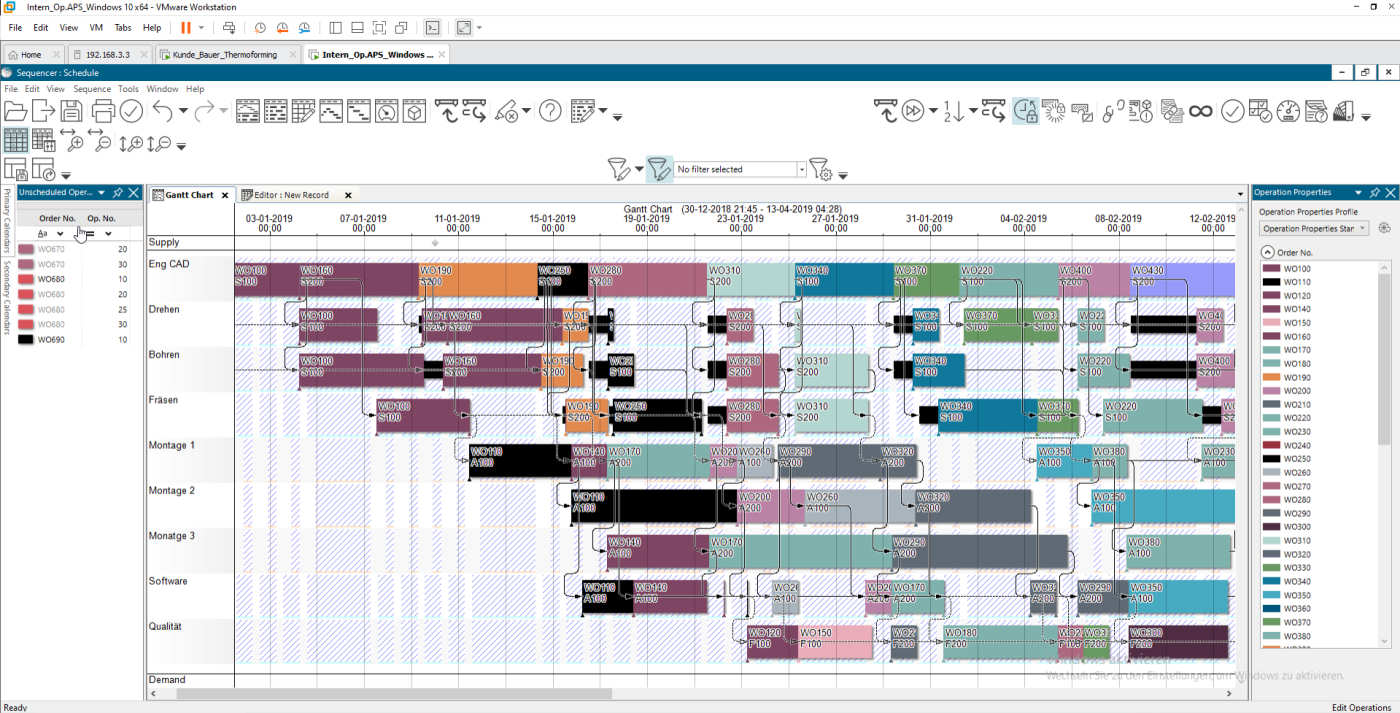
Keep track of capacity and orders: The shift and resource calendar visualizes the scheduling of available resources and highlights overlaps or bottlenecks early on.
Test Changes Before Implementing Them
A production schedule rarely remains unchanged for long. An urgent order, staff shortages, or a machine breakdown can necessitate last-minute adjustments.
“What-if” simulations allow you to test different scenarios before actually changing the plan. This enables a more informed assessment of order priorities or alternative resource allocations.
Potential delivery dates can also be evaluated based on a more realistic planning framework.
Integrates into existing system landscapes
Opcenter APS can work with ERP systems as well as downstream MES or BDE solutions. Its open system architecture allows it to be deployed within existing IT landscapes or as a standalone solution.
Your benefits with Opcenter APS
- Feasible production plans that take actual resources into account
- Identify bottlenecks and scheduling conflicts early on
- Structured scheduling of short-term changes
- “What-if” scenarios to support planning decisions
- More targeted reduction of setup and idle times
- Better control of lead times and inventory levels
- Assess delivery dates on a reliable basis
- Integrate ERP, MES, and BDE systems